
A Multi-Cluster Kasten Backup Dashboard That Needs No Kasten Credentials

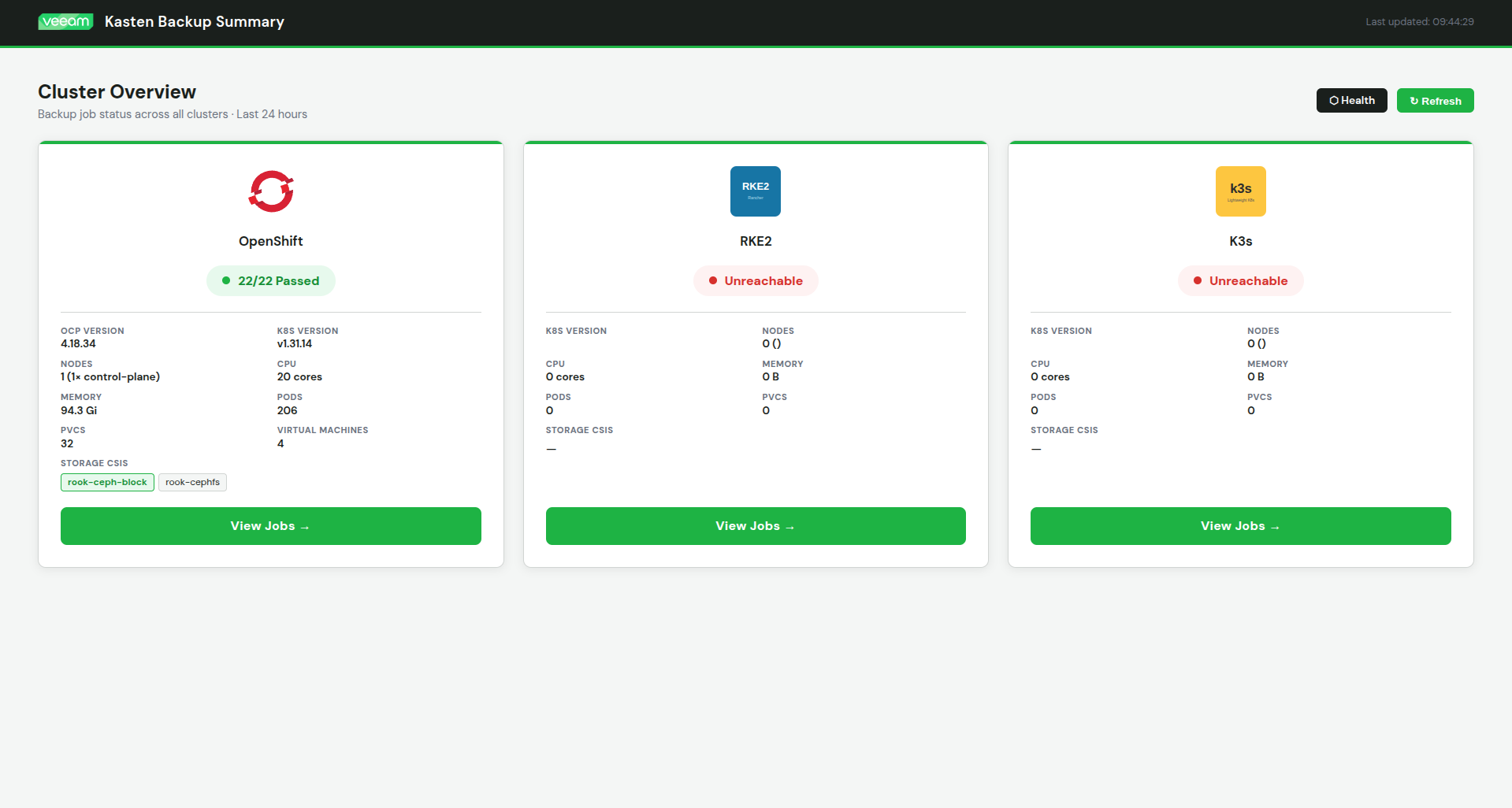
https://github.com/jdtate101/kasten-summary-service
A self-hosted web dashboard for monitoring Kasten K10 backup jobs across multiple Kubernetes clusters — querying CRDs directly, deployed as a single container on OpenShift, no Kasten API credentials required.
If you run Kasten K10 across multiple clusters, the built-in Kasten UI gives you a per-cluster view. Switching between clusters to check overnight backup runs is tedious, and there's no single pane of glass that shows you pass/fail counts, failed job error messages, and restore activity across the whole estate at once.
This dashboard fills that gap. It's a FastAPI + vanilla JS app deployed on OpenShift that queries Kasten's Kubernetes CRDs directly — backupactions, exportactions, restoreactions, policies, policypresets — using read-only service account tokens. No Kasten API credentials, no Kasten web UI dependency, no scraping. Add a cluster by editing a ConfigMap and restarting the pod.
What it shows
The summary page gives you pass/fail run counts per cluster at a glance, auto-refreshing every 30 seconds. From there you can drill into any cluster for a full job view: backup runs rolled up by run action, expandable to individual namespace actions, with root cause error messages extracted from Kasten's nested error chain for anything that failed.
Beyond the core backup view, the dashboard also surfaces: restore activity for the last 30 days per cluster, a namespace health strip showing the last snapshot time per namespace with stale/failed indicators, a 7-day policy compliance heatmap, a VM summary view with KubeVirt detail, and a policies audit view that lists each policy alongside its preset alignment.
Cluster info panels show Kubernetes/OpenShift version, node count, CPU, memory, pods, PVCs, VMs, and storage CSIs. Search and filter let you narrow by policy name, namespace, or run action name. PDF export via the browser print stylesheet. Dark and light mode.
Architecture
The entire application runs as a single Alpine container. Nginx serves the static frontend on port 8080 and proxies /api/* requests to a FastAPI backend on localhost:8000. The backend queries each cluster's Kubernetes API directly using service account tokens.
Browser
  │
  ▼
Nginx :8080 (static files + /api/ proxy)
  │
  ▼
FastAPI :8000
  │
  ├── K8s API (in-cluster, OpenShift)  — Kasten CRDs
  ├── K8s API (RKE2, remote token)     — Kasten CRDs
  └── K8s API (K3s, remote token)      — Kasten CRDs
The host cluster uses the pod's in-cluster service account token automatically. Remote clusters each get a dedicated read-only service account with a non-expiring token Secret, stored in a Kubernetes Secret on the host cluster and injected as environment variables.
Cluster configuration lives entirely in a ConfigMap. Adding a cluster means editing the ConfigMap, adding a token to the Secret, and restarting the pod — no rebuild required.
Deployment
1. Prepare each remote cluster
Run these steps on every cluster the dashboard will monitor.
Create the service account and read-only ClusterRole:
kubectl -n kasten-io create serviceaccount dashboardbff-svc

kubectl apply -f - <<EOF
apiVersion: rbac.authorization.k8s.io/v1
kind: ClusterRole
metadata:
  name: kasten-dashboard-reader
rules:
- apiGroups: ["actions.kio.kasten.io"]
  resources: ["backupactions", "exportactions", "restoreactions"]
  verbs: ["get", "list"]
- apiGroups: ["config.kio.kasten.io"]
  resources: ["policies", "policypresets", "profiles"]
  verbs: ["get", "list"]
EOF

kubectl apply -f - <<EOF
apiVersion: rbac.authorization.k8s.io/v1
kind: ClusterRoleBinding
metadata:
  name: kasten-dashboard-reader
roleRef:
  apiGroup: rbac.authorization.k8s.io
  kind: ClusterRole
  name: kasten-dashboard-reader
subjects:
- kind: ServiceAccount
  name: dashboardbff-svc
  namespace: kasten-io
EOF
Create a non-expiring token Secret and retrieve the token:
kubectl apply -f - <<EOF
apiVersion: v1
kind: Secret
metadata:
  name: dashboardbff-svc-token
  namespace: kasten-io
  annotations:
    kubernetes.io/service-account.name: dashboardbff-svc
type: kubernetes.io/service-account-token
EOF

kubectl -n kasten-io get secret dashboardbff-svc-token \
  -o jsonpath='{.data.token}' | base64 -d
Also grab the API server URL:
kubectl config view --minify -o jsonpath='{.clusters[0].cluster.server}'
2. Prepare the host OpenShift cluster
The host cluster needs a broader ClusterRole since the dashboard also reads cluster metadata:
oc apply -f - <<EOF
apiVersion: rbac.authorization.k8s.io/v1
kind: ClusterRole
metadata:
  name: kasten-dashboard-reader
rules:
- apiGroups: ["actions.kio.kasten.io"]
  resources: ["backupactions", "exportactions", "restoreactions"]
  verbs: ["get", "list"]
- apiGroups: ["config.kio.kasten.io"]
  resources: ["policies", "policypresets", "profiles"]
  verbs: ["get", "list"]
- apiGroups: [""]
  resources: ["nodes", "pods", "persistentvolumeclaims"]
  verbs: ["get", "list"]
- apiGroups: ["storage.k8s.io"]
  resources: ["storageclasses"]
  verbs: ["get", "list"]
- apiGroups: ["config.openshift.io"]
  resources: ["clusterversions"]
  verbs: ["get", "list"]
- apiGroups: ["kubevirt.io"]
  resources: ["virtualmachineinstances"]
  verbs: ["get", "list"]
EOF

oc apply -f - <<EOF
apiVersion: rbac.authorization.k8s.io/v1
kind: ClusterRoleBinding
metadata:
  name: kasten-dashboard-reader
roleRef:
  apiGroup: rbac.authorization.k8s.io
  kind: ClusterRole
  name: kasten-dashboard-reader
subjects:
- kind: ServiceAccount
  name: default
  namespace: kasten-io
EOF
3. Build and push the image
docker build -t harbor.your.domain/kasten-dashboard/kasten-dashboard:latest .
docker push harbor.your.domain/kasten-dashboard/kasten-dashboard:latest
If your registry uses a self-signed certificate:
openssl s_client -connect harbor.your.domain:443 -showcerts </dev/null 2>/dev/null \
  | sed -n '/-----BEGIN CERTIFICATE-----/,/-----END CERTIFICATE-----/p' > harbor-chain.crt

sudo mkdir -p /etc/docker/certs.d/harbor.your.domain
sudo cp harbor-chain.crt /etc/docker/certs.d/harbor.your.domain/ca.crt
sudo systemctl restart docker
4. Configure the ConfigMap
Edit k8s/configmap.yaml with your cluster API server URLs:
data:
  CLUSTER_1_NAME:       "openshift"
  CLUSTER_1_LABEL:      "OpenShift"
  CLUSTER_1_API_URL:    "https://kubernetes.default.svc"
  CLUSTER_1_IN_CLUSTER: "true"
  CLUSTER_1_LOGO:       "openshift.svg"

  CLUSTER_2_NAME:       "rke2"
  CLUSTER_2_LABEL:      "RKE2"
  CLUSTER_2_API_URL:    "https://192.168.1.99:6443"
  CLUSTER_2_LOGO:       "rke2.svg"

  CLUSTER_3_NAME:       "k3s"
  CLUSTER_3_LABEL:      "K3s"
  CLUSTER_3_API_URL:    "https://192.168.1.105:6443"
  CLUSTER_3_LOGO:       "k3s.svg"
5. Configure the Secret
Edit k8s/secret.yaml with the tokens from Step 1. Token keys must match CLUSTER_N_TOKEN where N corresponds to the cluster number in the ConfigMap:
stringData:
  CLUSTER_2_TOKEN: "eyJhbGci..."   # RKE2
  CLUSTER_3_TOKEN: "eyJhbGci..."   # K3s
Never commit real tokens to git. Use kubectl create secret directly or a secrets manager.6. Deploy
oc apply -f k8s/configmap.yaml
oc apply -f k8s/secret.yaml
oc apply -f k8s/deployment.yaml
oc apply -f k8s/route.yaml
If your registry uses a self-signed cert, add it to OpenShift's pull trust first:
oc create configmap harbor-ca \
  --from-file=harbor.your.domain=/path/to/selfsignCA.crt \
  -n openshift-config

oc patch image.config.openshift.io/cluster --type=merge \
  -p '{"spec":{"additionalTrustedCA":{"name":"harbor-ca"}}}'
Verify:
oc get pods -n kasten-io | grep dashboard
oc get route -n kasten-io kasten-dashboard
Adding a cluster
No rebuild required. On the new cluster, follow Step 1 to create the service account, ClusterRole, ClusterRoleBinding, and token Secret. Then on the host cluster:
oc edit configmap kasten-dashboard-config -n kasten-io
Add the new block, incrementing N:
CLUSTER_4_NAME:    "harvester"
CLUSTER_4_LABEL:   "Harvester"
CLUSTER_4_API_URL: "https://192.168.1.200:6443"
CLUSTER_4_LOGO:    "harvester.svg"
Add the token to the Secret:
oc edit secret kasten-dashboard-secrets -n kasten-io
stringData:
  CLUSTER_4_TOKEN: "eyJhbGci..."
Then restart the pod:
oc rollout restart deployment/kasten-dashboard -n kasten-io
The new cluster appears in the dashboard automatically.
Health check and monitoring integration
The /api/healthz endpoint is designed for external monitoring tools like Uptime Kuma or Prometheus:
| HTTP Status | Meaning |
|---|---|
200 OK |
All clusters reachable and Kasten API responding |
207 Multi-Status |
At least one cluster reachable (degraded) |
503 Service Unavailable |
No clusters reachable |
Example response:
{
  "status": "healthy",
  "timestamp": "2026-04-02T08:00:00Z",
  "clusters": {
    "openshift": {
      "reachable": true,
      "k8s_version": "v1.31.14",
      "response_ms": 12,
      "kasten_api": "ok"
    }
  }
}
For Uptime Kuma: monitor type HTTP(s), URL pointing at /api/healthz, expected status 200.
Troubleshooting
Cluster shows "Unreachable" — verify the API URL in the ConfigMap is correct and reachable from the pod, and that the token in the Secret is valid. Test connectivity directly:
oc exec -n kasten-io deployment/kasten-dashboard -- \
  curl -k https://<api-url>/version
Cluster shows 0 jobs — the ClusterRole is likely not bound correctly. Verify:
kubectl get clusterrolebinding kasten-dashboard-reader
oc exec -n kasten-io deployment/kasten-dashboard -- \
  curl -k -H "Authorization: Bearer <token>" \
  https://<api>/apis/actions.kio.kasten.io/v1alpha1/backupactions
Image pull errors — add the registry CA cert to OpenShift's additional trusted CAs (see Step 6), or verify the Harbor project is set to public.
Debug a specific cluster API call:
curl -k https://<dashboard-route>/api/debug/openshift?path=apis/actions.kio.kasten.io/v1alpha1/backupactions
Pod logs:
oc logs -n kasten-io deployment/kasten-dashboard
API reference
| Endpoint | Description |
|---|---|
GET /api/clusters |
List of configured clusters (id, label, logo) |
GET /api/summary |
Pass/fail run counts for all clusters |
GET /api/cluster/{name} |
Full job and restore detail for a cluster |
GET /api/cluster-info/{name} |
Cluster metadata (nodes, pods, PVCs, VMs, etc.) |
GET /api/healthz |
Health check for monitoring tools |
GET /api/health |
Simple liveness probe |
GET /api/debug/{name}?path=... |
Raw K8s API proxy for troubleshooting |