
Kasten Backup Alerter — Email Alerts for K10 Failures Without the Browser

https://github.com/jdtate101/kasten-alerter-service
A lightweight Kubernetes CronJob that queries Kasten's backup CRDs across multiple clusters, deduplicates failures, and sends an HTML email when something goes wrong — no dashboard required.
The Kasten Backup Summary Dashboard is great for when you're actively looking. But you shouldn't have to look. The Kasten Backup Alerter is the background half of the monitoring stack: a CronJob that runs hourly, checks backupactions CRDs across every configured cluster, and emails you when something has failed — once per failure, not once per run.
It's a single Python script in an Alpine container. No FastAPI, no nginx, no persistent volume. State lives in a ConfigMap. The only external dependency is httpx.
How it works
Every hour the CronJob wakes up, queries Kasten's backupactions CRD across all configured clusters within a rolling lookback window, and filters for failures. For each failure it constructs an alert ID in the format {cluster}:{run-action-name}:{date} and checks it against a deduplication ConfigMap (kasten-alerter-sent). Failures that haven't been alerted yet get bundled into a single HTML email and sent via Gmail SMTP. The dedup ConfigMap is then updated, and any entries older than 7 days are pruned automatically.
CronJob (hourly)
  │
  ├── Query backupactions CRD across all clusters
  ├── Filter failures within lookback window
  ├── Deduplicate against kasten-alerter-sent ConfigMap
  ├── Send HTML email via Gmail SMTP
  └── Update dedup ConfigMap (prune entries > 7 days)
       │                │               │
  K8s API          K8s API          K8s API
 (OpenShift)       (RKE2)           (K3s)
 in-cluster SA    SA token         SA token
The same failed run will only trigger one email per day. If the failure persists into the next day it will alert again — which is the right behaviour. The dedup cache is inspectable and clearable at any time.
Features
- Multi-cluster via
CLUSTER_N_*env vars — same pattern as the dashboard - Root cause extraction from Kasten's nested error JSON, surfacing the actual failure reason rather than a generic wrapper message
- Deduplication via a ConfigMap — no database, no PVC required
- Auto-expiry of dedup entries after 7 days
- Configurable lookback window — set slightly wider than the CronJob interval to avoid gaps
- HTML email with a plain-text fallback for clients that don't render HTML
- Reuses the
kasten-dashboard-readerClusterRole anddashboardbff-svcservice accounts from the main dashboard — no extra RBAC setup if the dashboard is already deployed
Prerequisites
- OpenShift with Kasten K10 in
kasten-io - The
kasten-dashboard-readerClusterRole already applied (reused from the dashboard) - Remote clusters already set up with
dashboardbff-svcSA and token (same as the dashboard) - Gmail account with 2FA enabled and an App Password from https://myaccount.google.com/apppasswords
Deployment
1. Prepare remote clusters
If you've already deployed the dashboard, the remote cluster RBAC is already in place — skip this step. Otherwise, apply the remote cluster RBAC on each K3s/RKE2 cluster and retrieve the SA token:
kubectl apply -f ../k8s/remote-cluster-rbac.yaml

kubectl -n kasten-io get secret dashboardbff-svc-token \
  -o jsonpath='{.data.token}' | base64 -d
2. Configure the ConfigMap
Edit k8s/configmap.yaml:
data:
  SMTP_HOST: "smtp.gmail.com"
  SMTP_PORT: "587"
  SMTP_USER: "your-gmail@gmail.com"
  ALERT_FROM: "your-gmail@gmail.com"
  ALERT_TO: "recipient@example.com,another@example.com"
  ALERT_SUBJECT_PREFIX: "[Kasten Backup]"
  LOOKBACK_HOURS: "2"

  CLUSTER_1_NAME:       "openshift"
  CLUSTER_1_LABEL:      "OpenShift"
  CLUSTER_1_API_URL:    "https://kubernetes.default.svc"
  CLUSTER_1_IN_CLUSTER: "true"

  CLUSTER_2_NAME:       "rke2"
  CLUSTER_2_LABEL:      "RKE2"
  CLUSTER_2_API_URL:    "https://192.168.1.99:6443"

  CLUSTER_3_NAME:       "k3s"
  CLUSTER_3_LABEL:      "K3s"
  CLUSTER_3_API_URL:    "https://192.168.1.105:6443"
LOOKBACK_HOURS should be slightly more than the CronJob interval — with an hourly schedule, 2 ensures no gap between runs. With a 30-minute schedule, use 1.
3. Configure the Secret
Never commit real tokens to git. Apply the secret directly:
oc create secret generic kasten-alerter-secrets \
  --from-literal=SMTP_PASSWORD="your-app-password" \
  --from-literal=CLUSTER_2_TOKEN="your-rke2-token" \
  --from-literal=CLUSTER_3_TOKEN="your-k3s-token" \
  -n kasten-io --dry-run=client -o yaml | oc apply -f -
4. Build and push
cd alerter/
docker build -t harbor.your.domain/kasten-dashboard/kasten-alerter:latest .
docker push harbor.your.domain/kasten-dashboard/kasten-alerter:latest
5. Deploy
oc apply -f k8s/rbac.yaml
oc apply -f k8s/configmap.yaml
oc apply -f k8s/secret.yaml
oc apply -f k8s/cronjob.yaml

oc get cronjob -n kasten-io kasten-alerter
Testing
Run immediately without waiting for the schedule:
oc create job kasten-alerter-test --from=cronjob/kasten-alerter -n kasten-io
oc logs -n kasten-io job/kasten-alerter-test -f
To force an alert email when there are no recent failures, temporarily extend the lookback to find historical ones:
oc patch configmap kasten-alerter-config -n kasten-io \
  --type=merge -p '{"data":{"LOOKBACK_HOURS":"24"}}'

oc create job kasten-alerter-emailtest --from=cronjob/kasten-alerter -n kasten-io
oc logs -n kasten-io job/kasten-alerter-emailtest -f

# Reset afterwards
oc patch configmap kasten-alerter-config -n kasten-io \
  --type=merge -p '{"data":{"LOOKBACK_HOURS":"2"}}'
To re-send alerts for known failures (clear the dedup cache):
oc delete configmap kasten-alerter-sent -n kasten-io
Deduplication
Alert IDs are stored in the kasten-alerter-sent ConfigMap in kasten-io. Each ID takes the form:
{cluster}:{run-action-name}:{date}
For example: k3s:run-f2776nnj4l:2026-04-02
The same failed run only triggers one email per day. If the failure persists across multiple days it will alert again each day. Entries older than 7 days are pruned automatically on each run.
To inspect the cache:
oc get configmap kasten-alerter-sent -n kasten-io \
  -o jsonpath='{.data.sent}' | python3 -m json.tool
Changing the schedule
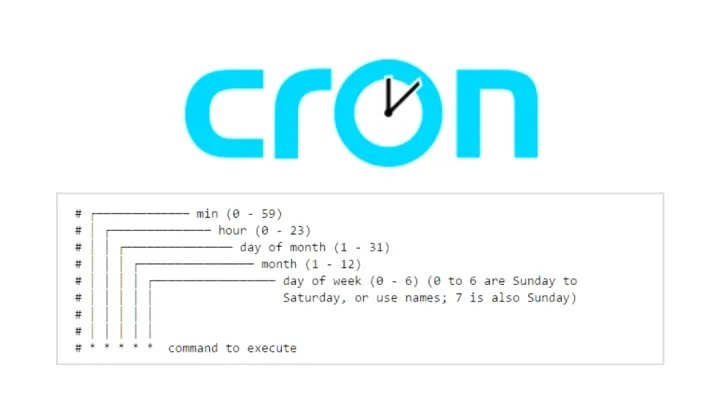
Edit the schedule field in k8s/cronjob.yaml using standard cron syntax:
| Schedule | Cron expression |
|---|---|
| Every hour | 0 * * * * |
| Every 30 minutes | */30 * * * * |
| Every 6 hours | 0 */6 * * * |
| Daily at 07:00 UTC | 0 7 * * * |
Remember to adjust LOOKBACK_HOURS in the ConfigMap to match — it should always be slightly wider than the interval to prevent gaps between runs.
Adding a cluster
No rebuild required. On the new cluster, follow the remote cluster RBAC steps in the dashboard README to create the service account and token. Then:
oc edit configmap kasten-alerter-config -n kasten-io
Add the new cluster block, incrementing N:
CLUSTER_4_NAME:    "harvester"
CLUSTER_4_LABEL:   "Harvester"
CLUSTER_4_API_URL: "https://192.168.1.200:6443"
Add the token:
oc patch secret kasten-alerter-secrets -n kasten-io \
  --type=merge \
  -p '{"stringData":{"CLUSTER_4_TOKEN":"eyJhbGci..."}}'
Test with a manual job run:
oc create job kasten-alerter-newcluster --from=cronjob/kasten-alerter -n kasten-io
oc logs -n kasten-io job/kasten-alerter-newcluster -f
Email format
Each alert email contains an HTML table with a plain-text fallback:
| Column | Description |
|---|---|
| Cluster | Display label from CLUSTER_N_LABEL |
| Run Action | Kasten run action name (e.g. run-f2776nnj4l) |
| Policy | The policy that triggered the run |
| Namespaces | All namespaces affected by this run |
| Error | Root cause extracted from Kasten's nested error chain |
Troubleshooting
401 Unauthorized on a remote cluster — the SA token is invalid or expired. Retrieve a fresh one and update the secret:
kubectl -n kasten-io get secret dashboardbff-svc-token \
  -o jsonpath='{.data.token}' | base64 -d
Email not sending — verify SMTP_USER, SMTP_PASSWORD, and ALERT_TO are correct, that 2FA is enabled on the Gmail account, and that the App Password is current. Test SMTP connectivity directly from the pod:
oc exec -n kasten-io job/<job-name> -- python3 -c \
  "import smtplib; s=smtplib.SMTP('smtp.gmail.com',587); s.starttls(); print('OK')"
No failures found despite known failures — increase LOOKBACK_HOURS beyond the age of the failure. Verify failure state using the dashboard's debug endpoint: /api/debug/{cluster}?path=apis/actions.kio.kasten.io/v1alpha1/backupactions. Note that Kasten uses Failed with a capital F.
View recent job history:
oc get jobs -n kasten-io | grep alerter
oc logs -n kasten-io job/<job-name>
Updating
docker build -t harbor.your.domain/kasten-dashboard/kasten-alerter:latest .
docker push harbor.your.domain/kasten-dashboard/kasten-alerter:latest
With imagePullPolicy: Always set in cronjob.yaml, the next scheduled execution picks up the new image automatically — no restart needed.
https://github.com/jdtate101/kasten-alerter-service
A lightweight Kubernetes CronJob that monitors Kasten K10 backup jobs across multiple clusters and sends email alerts when failures are detected. Runs independently of the Kasten Backup Summary Dashboard — no browser required.
Overview
The alerter runs on a configurable schedule (default: hourly), queries Kasten's backupactions CRDs directly across all configured clusters, and sends an HTML email summarising any new failures. A deduplication mechanism ensures each failed run only triggers one alert, regardless of how many times the CronJob executes.
┌─────────────────────────────────────────────────────┐
│              OpenShift CronJob (hourly)              │
│                                                      │
│  alerter.py                                          │
│    ├── Query backupactions CRD (all clusters)        │
│    ├── Filter failures within lookback window        │
│    ├── Deduplicate against kasten-alerter-sent CM    │
│    ├── Send HTML email via Gmail SMTP                │
│    └── Update dedup ConfigMap                        │
└─────────────────────────────────────────────────────┘
         │                    │                    │
    K8s API             K8s API             K8s API
   (OpenShift)          (RKE2)              (K3s)
   in-cluster SA        SA token            SA token
Features
- Multi-cluster — checks all clusters configured via
CLUSTER_N_*env vars - Root cause extraction — drills into Kasten's nested error JSON to surface the actual failure reason
- Deduplication — tracks sent alerts in a ConfigMap, preventing repeat emails for the same failure
- Auto-expiry — dedup entries older than 7 days are pruned automatically
- HTML email — clean Veeam-branded table showing cluster, run action, policy, namespaces, and error
- Configurable lookback — set how far back to check (default 2h, slightly more than the run interval)
- No external dependencies — only needs
httpx, everything else is Python stdlib
Project Structure
alerter/
├── Dockerfile          # Python 3.12 Alpine image
├── alerter.py          # Main script
├── requirements.txt    # httpx only
└── k8s/
    ├── configmap.yaml  # SMTP settings, cluster URLs, lookback window
    ├── secret.yaml     # Gmail App Password + remote cluster SA tokens
    ├── rbac.yaml       # Role + RoleBinding for ConfigMap read/write
    └── cronjob.yaml    # CronJob definition — runs hourly by default
File Descriptions
| File | Purpose |
|---|---|
alerter.py |
Discovers clusters from env vars, queries K8s API for failed backupactions, extracts root cause errors, deduplicates, sends email |
Dockerfile |
Minimal Alpine Python image — no nginx, no FastAPI, just the script |
k8s/configmap.yaml |
All non-sensitive config: SMTP host/port/user, recipient addresses, lookback window, cluster API URLs |
k8s/secret.yaml |
Sensitive values: Gmail App Password, remote cluster SA tokens |
k8s/rbac.yaml |
Namespace-scoped Role allowing the pod to read and write the dedup ConfigMap |
k8s/cronjob.yaml |
CronJob spec — schedule, image, resource limits, env injection |
Prerequisites
- OpenShift cluster with Kasten K10 installed in
kasten-ionamespace - The
kasten-dashboard-readerClusterRole already applied (from the main dashboard deployment) — the alerter reuses it - A Gmail account with 2FA enabled
- A Gmail App Password generated at https://myaccount.google.com/apppasswords
- Remote clusters already prepared with the
dashboardbff-svcservice account and token (see main dashboard README)
Deployment
1. Prepare Remote Clusters
If not already done from the main dashboard setup, apply the remote cluster RBAC on each K3s/RKE2 cluster and retrieve the SA token:
# Apply on each remote cluster
kubectl apply -f ../k8s/remote-cluster-rbac.yaml

# Retrieve the token
kubectl -n kasten-io get secret dashboardbff-svc-token \
  -o jsonpath='{.data.token}' | base64 -d
2. Generate a Gmail App Password
- Ensure 2FA is enabled on your Gmail account
- Go to https://myaccount.google.com/apppasswords
- Select app: Mail, device: Other (name it "Kasten Alerter")
- Copy the 16-character password — you won't see it again
3. Configure the ConfigMap
Edit k8s/configmap.yaml:
data:
  SMTP_HOST: "smtp.gmail.com"
  SMTP_PORT: "587"
  SMTP_USER: "your-gmail@gmail.com"
  ALERT_FROM: "your-gmail@gmail.com"
  ALERT_TO: "recipient@example.com,another@example.com"
  ALERT_SUBJECT_PREFIX: "[Kasten Backup]"
  LOOKBACK_HOURS: "2"

  CLUSTER_1_NAME:       "openshift"
  CLUSTER_1_LABEL:      "OpenShift"
  CLUSTER_1_API_URL:    "https://kubernetes.default.svc"
  CLUSTER_1_IN_CLUSTER: "true"

  CLUSTER_2_NAME:       "rke2"
  CLUSTER_2_LABEL:      "RKE2"
  CLUSTER_2_API_URL:    "https://192.168.1.99:6443"

  CLUSTER_3_NAME:       "k3s"
  CLUSTER_3_LABEL:      "K3s"
  CLUSTER_3_API_URL:    "https://192.168.1.105:6443"
LOOKBACK_HOURS should be set to slightly more than the CronJob interval. With an hourly schedule,2ensures no gap between runs. With a 30-minute schedule, use1.
4. Configure the Secret
Edit k8s/secret.yaml — never commit real values to git:
stringData:
  SMTP_PASSWORD: "abcd efgh ijkl mnop"   # Gmail App Password
  CLUSTER_2_TOKEN: "eyJhbGci..."          # RKE2 SA token
  CLUSTER_3_TOKEN: "eyJhbGci..."          # K3s SA token
Or apply directly without touching the file:
oc create secret generic kasten-alerter-secrets \
  --from-literal=SMTP_PASSWORD="your-app-password" \
  --from-literal=CLUSTER_2_TOKEN="your-rke2-token" \
  --from-literal=CLUSTER_3_TOKEN="your-k3s-token" \
  -n kasten-io --dry-run=client -o yaml | oc apply -f -
5. Update the Image Reference
Edit k8s/cronjob.yaml and set your registry:
image: harbor.your.domain/kasten-dashboard/kasten-alerter:latest
6. Build and Push
cd alerter/
docker build -t harbor.your.domain/kasten-dashboard/kasten-alerter:latest .
docker push harbor.your.domain/kasten-dashboard/kasten-alerter:latest
7. Deploy to OpenShift
oc apply -f k8s/rbac.yaml
oc apply -f k8s/configmap.yaml
oc apply -f k8s/secret.yaml
oc apply -f k8s/cronjob.yaml
Verify the CronJob is registered:
oc get cronjob -n kasten-io kasten-alerter
Testing
Run immediately without waiting for the schedule
oc create job kasten-alerter-test --from=cronjob/kasten-alerter -n kasten-io
oc logs -n kasten-io job/kasten-alerter-test -f
Force an alert email using a longer lookback window
If there are no recent failures to trigger an alert, temporarily extend the lookback to find historical failures:
# Extend lookback to 24 hours
oc patch configmap kasten-alerter-config -n kasten-io \
  --type=merge -p '{"data":{"LOOKBACK_HOURS":"24"}}'

# Run a test job
oc create job kasten-alerter-emailtest --from=cronjob/kasten-alerter -n kasten-io
oc logs -n kasten-io job/kasten-alerter-emailtest -f

# Reset lookback to normal
oc patch configmap kasten-alerter-config -n kasten-io \
  --type=merge -p '{"data":{"LOOKBACK_HOURS":"2"}}'
Clear the dedup cache (to re-send alerts for known failures)
oc delete configmap kasten-alerter-sent -n kasten-io
Changing the Schedule
Edit k8s/cronjob.yaml and update the schedule field using standard cron syntax:
| Schedule | Cron expression |
|---|---|
| Every hour | 0 * * * * |
| Every 30 minutes | */30 * * * * |
| Every 6 hours | 0 */6 * * * |
| Daily at 07:00 UTC | 0 7 * * * |
After editing, apply and restart:
oc apply -f k8s/cronjob.yaml
Remember to adjust LOOKBACK_HOURS in the ConfigMap to match — it should be slightly more than the interval to prevent gaps.Adding a New Cluster
Step 1 — Prepare the cluster
Follow the remote cluster RBAC steps in the main dashboard README (../README.md) to create the service account, ClusterRole, ClusterRoleBinding, and token secret.
Step 2 — Update the ConfigMap
oc edit configmap kasten-alerter-config -n kasten-io
Add the new cluster entries:
  CLUSTER_4_NAME:       "harvester"
  CLUSTER_4_LABEL:      "Harvester"
  CLUSTER_4_API_URL:    "https://192.168.1.200:6443"
Step 3 — Add the token to the Secret
oc patch secret kasten-alerter-secrets -n kasten-io \
  --type=merge \
  -p '{"stringData":{"CLUSTER_4_TOKEN":"eyJhbGci..."}}'
Step 4 — Test
oc create job kasten-alerter-newcluster --from=cronjob/kasten-alerter -n kasten-io
oc logs -n kasten-io job/kasten-alerter-newcluster -f
No rebuild required.
Deduplication
The alerter stores sent alert IDs in a ConfigMap named kasten-alerter-sent in the kasten-io namespace. Each alert ID has the format:
{cluster}:{run-action-name}:{date}
For example: k3s:run-f2776nnj4l:2026-04-02
This means:
- The same failed run will only trigger one email per day
- If a failure persists across multiple days it will alert again each day
- Entries older than 7 days are pruned automatically on each run
To inspect the dedup cache:
oc get configmap kasten-alerter-sent -n kasten-io -o jsonpath='{.data.sent}' | python3 -m json.tool
Email Format
The alert email contains an HTML table with:
| Column | Description |
|---|---|
| Cluster | The display label from CLUSTER_N_LABEL |
| Run Action | The Kasten run action name (e.g. run-f2776nnj4l) |
| Policy | The policy that triggered the run |
| Namespaces | All namespaces affected by this run |
| Error | Root cause extracted from Kasten's nested error chain |
A plain-text fallback is also included for email clients that don't render HTML.
Troubleshooting
401 Unauthorized on a remote cluster
The SA token in the secret is invalid or expired. Retrieve a fresh token:
kubectl -n kasten-io get secret dashboardbff-svc-token \
  -o jsonpath='{.data.token}' | base64 -d
Then update the secret and re-run.
Email not sending
- Check
SMTP_USER,SMTP_PASSWORDandALERT_TOare set correctly - Ensure 2FA is enabled on the Gmail account and the App Password is current
- Check the job logs for the specific SMTP error
- Test SMTP connectivity from the pod:
oc exec -n kasten-io job/<job-name> -- python3 -c "import smtplib; s=smtplib.SMTP('smtp.gmail.com',587); s.starttls(); print('OK')"
No failures found despite known failures
- Increase
LOOKBACK_HOURSbeyond the age of the failure - Check the failure state: Kasten uses
Failed(capital F) — verify with the debug endpoint on the dashboard:/api/debug/{cluster}?path=apis/actions.kio.kasten.io/v1alpha1/backupactions
View recent job history
oc get jobs -n kasten-io | grep alerter
oc logs -n kasten-io job/<job-name>
Updating the Alerter
# Make changes to alerter.py, then:
docker build -t harbor.your.domain/kasten-dashboard/kasten-alerter:latest .
docker push harbor.your.domain/kasten-dashboard/kasten-alerter:latest

# The next CronJob execution will pull the new image automatically
# (imagePullPolicy: Always is set in cronjob.yaml)
License
MIT