
ARCADIANS — Running a 1982 BBC Micro Game on OpenShift

 jdtate101
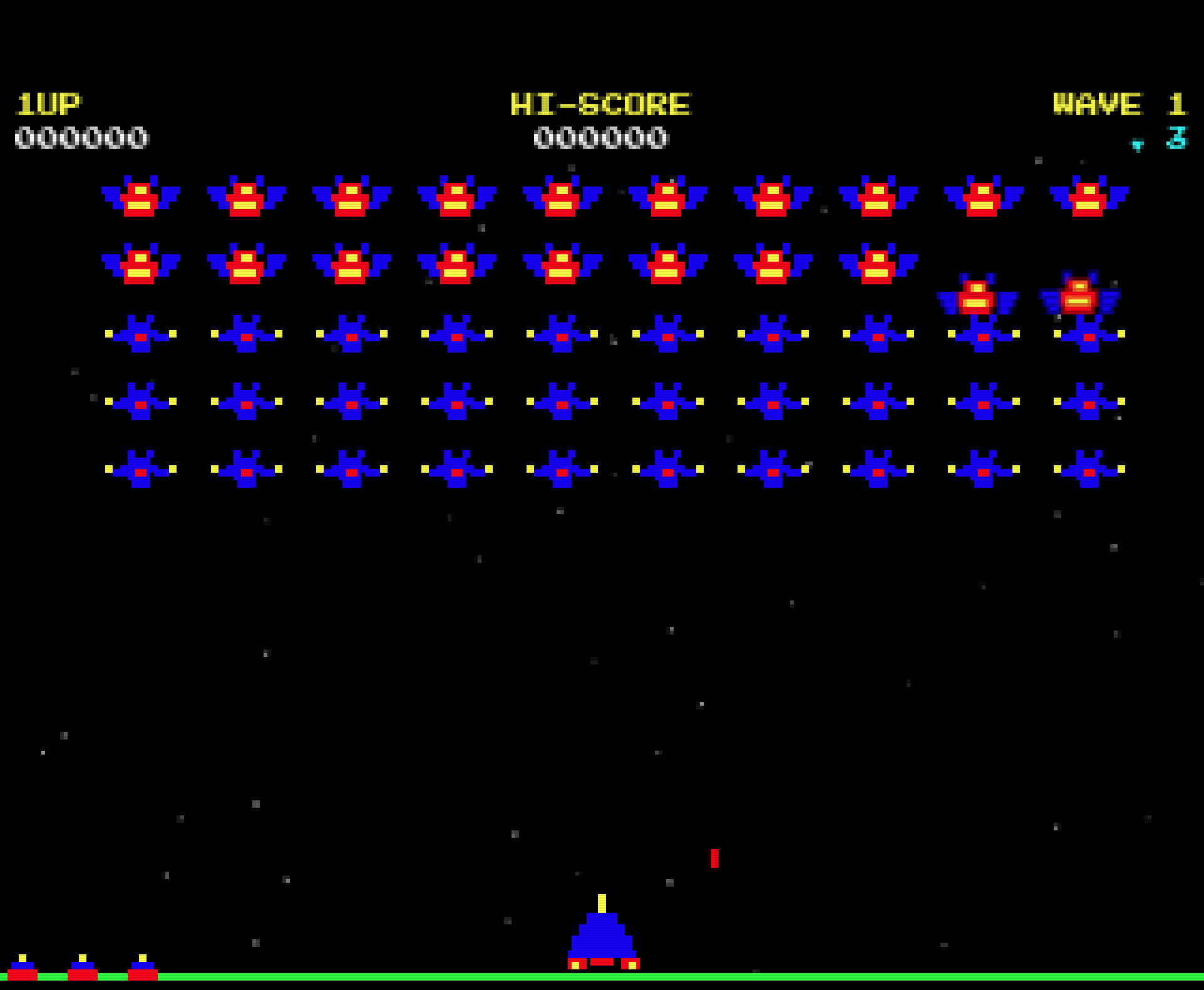
A faithful clone of Acornsoft's Arcadians, complete with swooping dive-bombers, the original intro music reconstructed via FFT analysis, and a PostgreSQL high score table — deployed as a full Kubernetes demo stack.
Arcadians was released by Acornsoft in 1982 for the BBC Micro — itself a clone of Namco's Galaxian, which was itself a response to Space Invaders. It's a game about aliens that hold formation, sweep side to side, then peel off in curved dive-bombing runs while shooting at you. Simple, brutal, compelling.
This project rebuilds it faithfully in HTML5 Canvas and Web Audio, wraps it in a FastAPI + PostgreSQL backend for persistent high scores, and deploys the whole thing on OpenShift as a Kubernetes demo stack — with Kanister backup, ArgoCD GitOps, and Harbor for image hosting.
Stack
| Component | Technology |
|---|---|
| Game | Vanilla HTML5 Canvas + Web Audio |
| API | FastAPI (Python 3.12) |
| Database | PostgreSQL 16 StatefulSet |
| Backup | Kanister non-exclusive blueprint |
| Registry | Harbor |
| Platform | OpenShift / RKE2 |
| Namespace | retro-game |
The game
Mechanics
The alien formation sweeps side to side across the screen. Groups periodically peel off and dive-bomb the player in curved paths, shooting as they go. Two alien types: Chargers in the top rows (higher value, more aggressive) and Convoy fillers making up the rest. Each wave the aliens speed up, shoot faster, and dive more aggressively.
Scoring is faithful to the original: 100 points for a diving Charger, 80 for a diving Convoy, 20–50 for formation kills depending on position.
Visuals and audio
The palette is locked to the eight BBC Micro colours: black, red, green, yellow, blue, magenta, cyan, white. No gradients, no alpha blending — exactly what the original hardware could produce.
Sound is synthesised entirely through the Web Audio API: the formation march tick, the shoot sound, the dive warble, alien explosion pops, and a layered player death boom with a 12-frame debris animation as the ship fragments outward.
The intro music deserves its own note. Rather than approximating it from memory, the melody was extracted via sliding-window FFT analysis of original BBC Micro Arcadians audio, producing a 39-note sequence in A minor that plays on the title screen. Any key starts it; Space skips it and drops straight into the game.
Controls
| Key | Action |
|---|---|
← / Z |
Move left |
→ / X |
Move right |
Space |
Fire |
| Any key | Start intro music (title screen) |
Space |
Skip intro / start game |
Hi-score table
The top 8 scores — initials, score, and wave reached — are persisted in PostgreSQL and displayed between games. The scores table is created automatically on API startup if it doesn't exist.
Architecture
The nginx frontend container proxies all /api/ requests to the arcadians-api ClusterIP service, so only a single OpenShift Route needs to be exposed. The API connects to PostgreSQL over the arcadians-postgresql ClusterIP service within the same namespace — nothing is exposed externally except the game itself.
Browser
  │
  ▼
nginx (arcadians-game Route)
  ├── Static: index.html, Canvas game
  └── Proxy: /api/ → arcadians-api ClusterIP
                          │
                          ▼
                    FastAPI (arcadians-api)
                          │
                          ▼
                    PostgreSQL 16 StatefulSet
The entire stack lives in the retro-game namespace and tears down cleanly with oc delete namespace retro-game.
Build and push images
# Game frontend
cd game
docker build -t harbor.apps.openshift2.lab.home/retro-game/arcadians-game:latest .
docker push harbor.apps.openshift2.lab.home/retro-game/arcadians-game:latest

# API backend
cd ../api
docker build -t harbor.apps.openshift2.lab.home/retro-game/arcadians-api:latest .
docker push harbor.apps.openshift2.lab.home/retro-game/arcadians-api:latest
Deploy to OpenShift
Apply manifests in order — PostgreSQL needs to be ready before the API starts:
oc apply -f k8s/00-namespace.yaml
oc apply -f k8s/01-postgresql.yaml

oc -n retro-game rollout status statefulset/arcadians-postgresql

oc apply -f k8s/02-api.yaml
oc apply -f k8s/03-frontend.yaml

oc -n retro-game rollout status deployment/arcadians-api
oc -n retro-game rollout status deployment/arcadians-game

oc -n retro-game get route arcadians
OpenShift SCC note
If the PostgreSQL pod fails to start due to SCC restrictions, grant anyuid to the default service account:
oc adm policy add-scc-to-user anyuid -z default -n retro-game
For a cleaner approach, use a dedicated service account:
oc create sa arcadians-sa -n retro-game
oc adm policy add-scc-to-user anyuid -z arcadians-sa -n retro-game
Then add serviceAccountName: arcadians-sa to the StatefulSet pod spec in 01-postgresql.yaml.
Kanister backup
The PostgreSQL StatefulSet is labelled to match the postgres-non-exclusive-backup Kanister blueprint deployed in kasten-io. The blueprint uses the PostgreSQL 15+ non-exclusive backup API (pg_backup_start / pg_backup_stop).
The blueprint expects these naming conventions:
app.kubernetes.io/instance: arcadians     # used to build PGHOST
Secret name: arcadians-postgresql         # must be {{ instance }}-postgresql
Secret key:  postgres-password
To trigger a manual backup, set your Kanister profile name in 04-kanister-actionset.yaml then apply:
oc apply -f k8s/04-kanister-actionset.yaml -n kasten-io
oc -n kasten-io get actionset arcadians-postgresql-backup -w
ArgoCD integration
Push the repo to Gitea and create an ArgoCD Application pointing at the k8s/ directory for fully automated GitOps deployment:
apiVersion: argoproj.io/v1alpha1
kind: Application
metadata:
  name: arcadians
  namespace: argocd
spec:
  project: default
  source:
    repoURL: https://YOUR_GITEA/YOUR_ORG/arcadians.git
    targetRevision: HEAD
    path: k8s
  destination:
    server: https://kubernetes.default.svc
    namespace: retro-game
  syncPolicy:
    automated:
      prune: true
      selfHeal: true
API reference
| Method | Path | Description |
|---|---|---|
GET |
/api/scores |
Top 10 scores ordered by score descending |
POST |
/api/scores |
Submit a new score |
GET |
/healthz |
Liveness/readiness health check |
POST body:
{ "initials": "JTT", "score": 12340, "wave": 5 }