
Which of my Kubernetes apps are out of date? A bash image and Helm chart checker for RKE2

A single bash script that walks every Deployment and StatefulSet on a cluster, checks each container image against its registry, works out which apps came from Helm, and tells you whether you need helm upgrade or just a new image tag.
The problem
My homelab RKE2 cluster has crept up to about 50 namespaces: Longhorn, GitLab, Kasten, Argo CD, Plane, Nextcloud, and a long tail of small apps. Every one of them pins an image tag, and every one of those tags is slowly going stale.
I wanted one answer to one question: what's out of date, and how do I fix it?
That turned out to be two different questions:
- For a plain manifest, the fix is a newer image tag.
- For anything installed with Helm, the fix is a newer chart. Bumping an image inside a Helm release is fighting the chart, and the next
helm upgradeundoes it.
Most tools I looked at answer the first question or the second. I wanted both in one view, grouped by namespace, so I wrote a script.
What it does
For every Deployment and StatefulSet (optionally DaemonSets and init containers too) it:
- lists every container in the workload, not just the first
- follows the image reference to its registry and finds the newest release of the same shape
- colour-codes the result: up to date, patch, minor, major, floating tag, or couldn't check
- detects workloads deployed by Helm, groups them under their release, and compares the chart version with the latest published one
- finishes with a table of releases that need a
helm upgrade, and a summary that separates "fixed by a chart upgrade" from "needs direct action"
Here's a slice of the image report from my cluster:
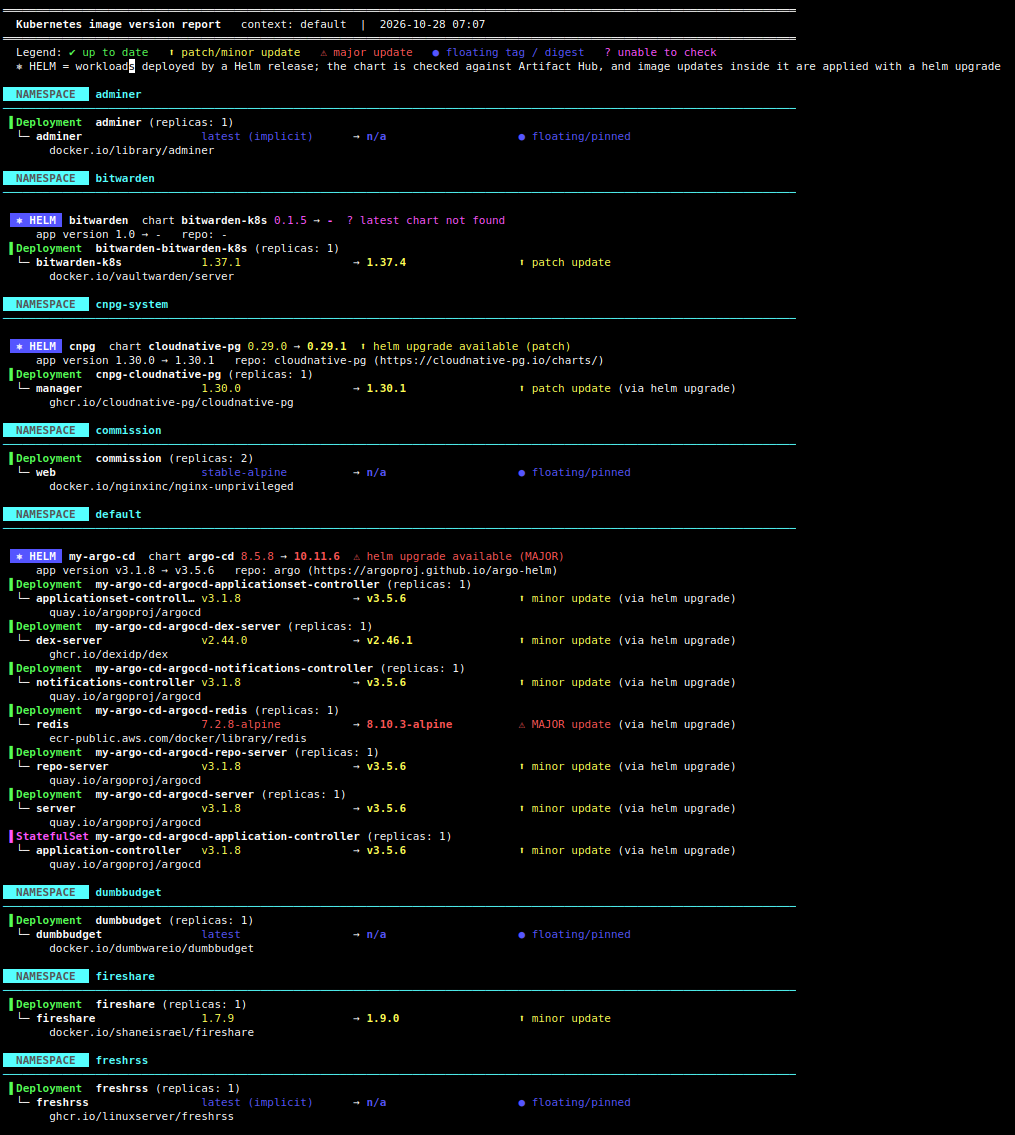
And with the Helm layer on top, the same namespaces look like this (illustrative output):
  NAMESPACE   argo
────────────────────────────────────────────────────────────────────────

  ⎈ HELM  my-argo-cd  chart argo-cd 8.3.7 → 8.6.1  ⬆ helm upgrade available (minor)
     app version v3.1.8 → v3.5.6   repo: argo (https://argoproj.github.io/argo-helm)
 ▌Deployment  server (replicas: 1)
  └─ server                   v3.1.8                 → v3.5.6                 ⬆ minor update (via helm upgrade)
       quay.io/argoproj/argocd
The (via helm upgrade) hint matters. It tells you not to touch that image tag. If a chart is current but the image is behind, the hint reads (pinned in chart values), which means somebody (me) overrode the tag in values.yaml and it needs a direct change.
Requirements
Just bash 4+, kubectl, jq and curl. No Helm CLI, no Python, no cluster-side install. On an RKE2 server node it falls back to /etc/rancher/rke2/rke2.yaml if KUBECONFIG isn't set.
chmod +x k8s-image-check.sh

./k8s-image-check.sh                  # everything
./k8s-image-check.sh -s -u            # skip system namespaces, only show things that need updating
./k8s-image-check.sh -n gitlab        # one namespace
./k8s-image-check.sh -d -i            # include DaemonSets and init containers
./k8s-image-check.sh -j | jq          # JSON for piping into something else
./k8s-image-check.sh --no-helm        # images only
How it works
1. Finding the images
One kubectl get deployments,statefulsets -A -o json call, then jq flattens each workload into a tab-separated row: namespace, kind, name, replicas, and a list of name|image pairs for every container. That list is what lets a pod with a sidecar report both images.
2. Asking the registry for tags
Every container registry speaks the same OCI distribution API. GET /v2/<repo>/tags/list returns the tags. In practice, anonymous access works like this:
- Request the tag list and get a
401. - Read the
WWW-Authenticateheader for the tokenrealm,serviceandscope. - Fetch an anonymous pull token from that realm.
- Retry with
Authorization: Bearer <token>.
That one flow covers Docker Hub, GHCR, Quay, GCR-style registries and registry.k8s.io. The script also follows Link: rel="next" headers for pagination and caches results per repository, so an image used by ten workloads is only looked up once.
3. Deciding what "latest" means
Picking the highest tag is dangerous. 1.25.3-alpine must be compared with other X.Y.Z-alpine tags, not with 1.29.0-bookworm, or you'd recommend switching base images.
So the script splits your current tag into a prefix (v), the numeric parts, and a suffix (-alpine), builds a regex with the same shape, filters the tag list to matches, and uses sort -V to find the newest. The difference between current and newest decides the colour:
| Colour | Meaning |
|---|---|
| ✔ green | on the newest tag of that shape |
| ⬆ yellow | patch or minor update available |
| ⚠ red | major version behind |
| ● blue | floating tag (latest, stable, main, or a custom name) so there's nothing to compare |
| ? magenta | couldn't query the registry, or no comparable tags |
4. Spotting Helm releases
This was the bit I enjoyed most. Helm 3 stores each release revision as a Kubernetes Secret (sh.helm.release.v1.<name>.v<N>). The payload is base64-encoded by Kubernetes, then base64 again by Helm, then gzipped JSON. So no Helm binary is needed:
kubectl get secrets -A -l owner=helm,status=deployed -o json \
  | jq -r '.items[] | [.metadata.namespace, .metadata.labels.name, .data.release] | @tsv' \
  | while IFS=$'\t' read -r ns rel data; do
      base64 -d <<<"$data" | base64 -d | gunzip \
        | jq -r '[.chart.metadata.name, .chart.metadata.version, .chart.metadata.appVersion] | @tsv'
    done
Workloads are then mapped to releases using the meta.helm.sh/release-name annotation that Helm puts on everything it creates. This matters for umbrella charts. In my GitLab namespace, envoy-gateway has its own helm.sh/chart label, but it belongs to the gitlab release, and the release secret correctly reports the top-level gitlab chart. If a release secret isn't available (an app rendered by Argo CD, say), the script falls back to the helm.sh/chart label and tells you it did.
5. Finding the latest chart
Helm charts don't record which repo they came from, so the script asks Artifact Hub:
GET /api/v1/packages/search?ts_query_web=<chart>&kind=0
GET /api/v1/packages/helm/<repo>/<chart>/<version>
Chart names aren't unique, so the first call returns candidates and the second picks the right one: the repo that actually contains the version you're running. If none does, it takes the best match and flags it with ~ as unverified.
Things that bit me
- Huge tag lists. My first version stopped reading after 30 pages.
quay.ioandregistry.gitlab.comrepos have thousands of tags and aren't listed newest-first, so the release tags never appeared and 19 images showed "no comparable tags". Quay's own API returns newest first, so the script now uses that for Quay, and-p Nraises the page cap for everything else. Result: unresolved images went from 19 to 4. - Multibyte characters and
tr. I drew the═rules withtr ' ' '═', which splits UTF-8 byte-wise and prints garbage. A plain loop withprintffixed it. - Empty fields in tab-separated rows.
readtreats tab as whitespace and collapses consecutive delimiters, so an empty field shifts every column after it. Every field needs a placeholder (-or~). - Sidecars aren't independent. Longhorn's
csi-provisioner v4.0.1 → v6.3.0looks like a scary major update, but those versions are pinned by the Longhorn release. The real finding is Longhorn itself atv1.7.1againstv1.13.0. The Helm view exists for exactly this reason. - Bitnami.
bitnami/mysql,bitnami/mariadbandbitnami/mongodbon Docker Hub no longer return versioned tags in my results. As far as I can tell Bitnami moved its versioned images in 2025, so anything still pointing atdocker.io/bitnamiis on a repo that no longer publishes releases. Worth checking yours.
What the first run told me
109 images across the cluster: 30 current, 28 with a patch or minor update, 25 major, 22 on floating tags, and 4 I couldn't check. The floating tags aren't something this tool can fix, so they're a reminder to pin versions. Several of the "major" results are real work rather than a quick bump. Postgres 13 or 15 to 18 needs a dump and restore or pg_upgrade, and Nextcloud has to be upgraded one major version at a time.
Limitations
- Private registries that need credentials show as "lookup failed".
- Digest-only references (
image@sha256:...) can't be compared, so they're reported as pinned. - Charts that aren't on Artifact Hub (some private or OCI-only ones) show as "latest chart not found".
- Release secrets need read access to Secrets in the relevant namespaces. Without it the script falls back to workload labels.
- "Major" is purely a version-number comparison. A
0.xchart can break things in a minor bump, and a "minor" can contain breaking changes, so read the release notes first. - It tells you what's out of date. It doesn't upgrade anything.
What's next
- a
--fail-on majorexit code so it can run in CI or a CronJob - diffing two runs to show what changed since last week
- pushing the JSON into Prometheus or Grafana so staleness is a dashboard, not a script I remember to run
If you run RKE2, K3s or any other Kubernetes distribution and want to try it, the script is linked at the top. Issues and ideas welcome.