
When Longhorn Says No: Recovering 52 Faulted Volumes on a Single-Node RKE2 Cluster

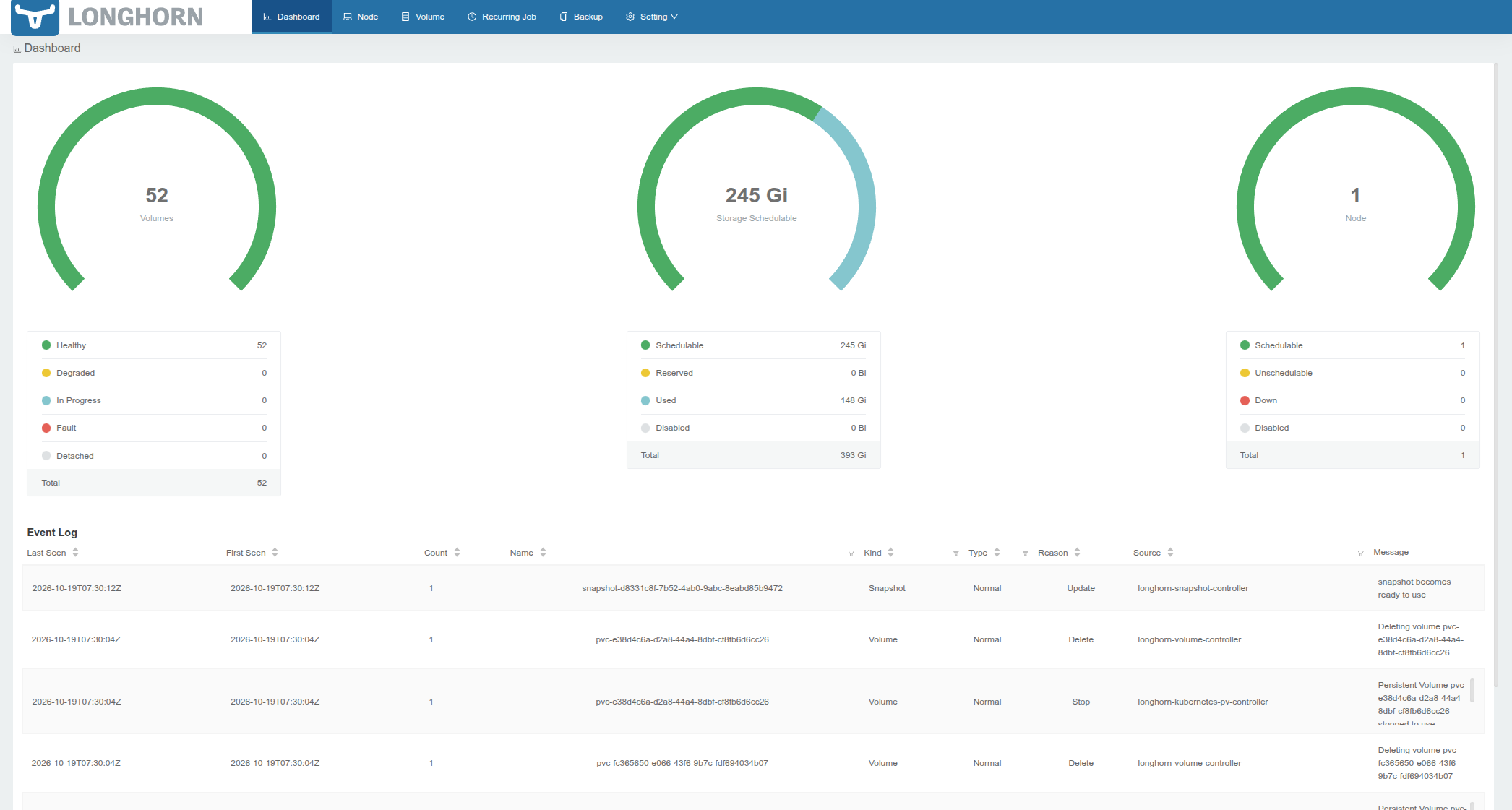
One Monday morning my homelab RKE2 node rebooted and came back "healthy" while nearly every workload on it was dead. The node was Ready, kubelet was happy, etcd was happy. Every Longhorn volume was detached / faulted, and dozens of pods sat in Unknown or ContainerCreating.
This post walks through how Longhorn actually attaches a PVC, why a single setting (storage-minimal-available-percentage) was able to block recovery, how the disk ended up needing a resize, and the order of steps that got everything back. It is also a good example of how a storage layer can fail while everything above it still reports green.
Environment: single-node RKE2 v1.35.3, Longhorn v1.7.1, one 200 GB ext4 disk mounted at /longhorn, 52 application volumes, each with one replica. Kasten K10 backing it all up. This is a lab environment on a single server, hence the single node setup.
Longhorn architecture in five minutes
Longhorn is a distributed block storage system that runs entirely as pods in longhorn-system. The pieces that matter here:
- longhorn-manager (DaemonSet): the control plane. It reconciles Longhorn's custom resources and makes every scheduling and state decision.
- instance-manager: the process host. Each volume gets one engine process (the block device front end) and one replica process per copy of the data, all running inside the instance-manager pod on the node.
- Replicas: the actual data. On disk they are sparse files under
/longhorn/replicas/<pvc>-<id>/. That directory is the thing you must never delete by hand. - CSI components:
csi-attacher,csi-provisioner,csi-resizer,csi-snapshotterand the per-nodelonghorn-csi-plugin. These translate Kubernetes storage calls into Longhorn API calls. - Custom resources:
volumes,engines,replicas,nodes(which carry the disk definitions and their conditions), andvolumeattachments.longhorn.io(attachment tickets).
Two things about this design are easy to miss:
- Longhorn keeps its own state, separate from Kubernetes. Kubernetes has
VolumeAttachmentobjects. Longhorn has its own volume state and its own attachment tickets. They are supposed to agree, and when they don't, nothing moves. - Replicas are placed and started only on a schedulable disk. A disk is schedulable when its available space, as a percentage of its maximum, is above
storage-minimal-available-percentage(default 25%). That check is not only for creating new replicas. It also applies when Longhorn wants to start an existing replica again.
How a PVC gets attached
This is the full path from "pod scheduled" to "bytes readable", and it is the part worth understanding before you debug anything.
Pod scheduled to node
  -> kube-controller-manager creates a Kubernetes VolumeAttachment
  -> csi-attacher calls ControllerPublishVolume on the Longhorn CSI driver
  -> Longhorn creates an attachment ticket (volumeattachments.longhorn.io)
  -> longhorn-manager's volume controller starts the replicas and the engine
     via instance-manager (this needs a usable, schedulable replica)
  -> engine exposes a block device (/dev/sdX) on the node
  -> kubelet calls NodeStageVolume (longhorn-csi-plugin formats/mounts it)
  -> NodePublishVolume bind-mounts it into the pod
The two error messages that matter map to two different points in that chain:
rpc error: code = Aborted desc = volume pvc-... is not ready for workloadscomes from the attach step. Longhorn refuses to attach a volume whose robustness isfaulted.MountVolume.MountDevice failed ... volume pvc-... hasn't been attached yetcomes from the stage step. It is just kubelet reporting that the attach never happened. It is a symptom, not the cause.
Everything above the attach step looks like a pod problem (Unknown, ContainerCreating, CrashLoopBackOff). The cause was sitting underneath.
What went wrong
Symptoms
kubectl get pods -A -o wide | grep -v -E 'Running|Completed'
Dozens of pods in Unknown and ContainerCreating, with FailedMount events on nearly every namespace. Then the Longhorn view:
kubectl -n longhorn-system get volumes.longhorn.io
Every volume: detached and faulted. Replica state:
kubectl -n longhorn-system get replicas.longhorn.io \
  -o custom-columns=NAME:.metadata.name,STATE:.status.currentState,FAILEDAT:.spec.failedAt
All replicas stopped, each with failedAt set within a minute or so of the boot.
Ruling out the obvious
Before blaming Longhorn, I checked the usual suspects:
- The node was
Readywith no pressure conditions, so it was not a node fault. /longhorn(sdb1) was mounted read-write, the Longhorn disk wasReady, anddmesgshowed no filesystem errors on that boot.- All 52 replica directories were present under
/longhorn/replicas/, so the data was intact. - The JBD2 I/O errors in the previous boot's log were the Longhorn block devices disappearing at shutdown, not a physical disk problem.
So the data was there and the disk was healthy. The volumes were still faulted. That points at Longhorn's own state machine, not at hardware.
Why every volume was faulted
I run each volume with a single replica. That is fine for a homelab on one disk, but it has a consequence: when the instance manager restarts, the only replica of every volume stops. With nothing left to serve I/O, the volume's robustness becomes faulted, and Longhorn marks the replicas failedAt.
Longhorn is designed to recover from exactly this with auto-salvage: when all replicas have failed, it picks the best candidate and brings it back. The manager logs showed it trying, over and over:
All replicas are failed, auto-salvaging volume
Bringing up replicas for auto-salvage
The same volumes, the same lines, every 30 seconds, and never any progress. This is the loop I spent too long on.
The stale attachment problem
At the same time, Kubernetes still had 51 VolumeAttachment objects marked attached: true while Longhorn had every volume detached with an empty ticket list:
kubectl get volumeattachments --no-headers | awk '{print $5}' | sort | uniq -c
kubectl -n longhorn-system get volumeattachments.longhorn.io <pvc> -o yaml | sed -n '/^spec:/,$p'
# attachmentTickets: {}
Kubernetes believed the volumes were attached, so it never re-requested them. Longhorn had no ticket, so it never started them. Deleting the stale Kubernetes VolumeAttachment objects forces the CSI attacher to ask again:
kubectl get volumeattachments --no-headers \
  | awk '$2=="driver.longhorn.io"{print $1}' \
  | xargs kubectl delete volumeattachment --wait=false
This is safe because it only removes Kubernetes' record of the attachment. The data on disk is untouched. It got the attach requests flowing again, but the attacher then failed with volume is not ready for workloads, because the volumes were still faulted. A fresh attach attempt cannot fix a volume Longhorn refuses to start.
The real blocker: the disk was unschedulable
The decisive clue was in the Longhorn node object:
kubectl -n longhorn-system get nodes.longhorn.io rke2-prod \
  -o jsonpath='{.status.diskStatus.disk-1.conditions}' | jq -r '.[] | "\(.type)=\(.status) \(.message)"'
Ready=True      Disk disk-1(/longhorn) on node rke2-prod is ready
Schedulable=False  Disk disk-1 (/longhorn) on the node rke2-prod has 51799654400 available,
                   but requires reserved 0, minimal 25% to schedule more replicas
The disk was healthy but unschedulable: free space had dropped just under 25% of capacity. The condition had flipped to False at 06:01:34 UTC, about 13 minutes before the node rebooted.
I assumed this only mattered for placing new replicas. It matters for recovery as well. When I tried the supported manual salvage through the Longhorn API, it failed:
unable to salvage volume pvc-a416a7b8-...: disk with UUID 4cea7c9f-... on node rke2-prod
is unschedulable for replica pvc-a416a7b8-...-r-be528f96
That one line explains the endless auto-salvage loop. Salvage needs to start the existing replica, starting a replica requires a schedulable disk, and the disk sat 0.4% under the line. The data was on the disk, the replica was fine, and the minimum-availability rule refused to let it run. The chain was:
free space < 25%
  -> disk Schedulable=False
  -> salvage/replica start refused
  -> replicas stay failed, volumes stay faulted
  -> CSI attacher: "volume is not ready for workloads"
  -> kubelet: "hasn't been attached yet"
  -> pods stuck in ContainerCreating / Unknown
What pushed the disk under the line
The disk was around 75% full, which is already close to a 25% free-space floor on its own. The likely trigger was a Kasten export run that started at 06:00 UTC and created several temporary kanister-pvc-* volumes that copy data. The timing fits: kubelet proxy errors began around then, the disk went unschedulable at 06:01, and the first replica failed at 06:02. I can't prove that Kasten was the cause of the reboot itself. I never found out why the node went down at 07:14 BST, and nothing in the previous boot's log showed an OOM or hung task. What I can say is that the single-replica design plus an almost-full disk turned an ordinary reboot into a full storage outage.
One more detail: Longhorn's "available" figure did not match df. Longhorn showed 51.8 GB available while df showed 38.3 GB. The most likely reason is ext4's reserved blocks, which Longhorn counts as free. Real headroom was smaller than Longhorn reported.
Recovery
1. Clear the failed marker on the replicas
With salvage refused, I cleared failedAt on a canary volume's replica (a 100 MB one, low risk) directly in the CR. This edits Longhorn metadata only and leaves the replica data alone:
R=$(kubectl -n longhorn-system get replicas.longhorn.io -l longhornvolume=$V -o jsonpath='{.items[0].metadata.name}')
kubectl -n longhorn-system patch replicas.longhorn.io $R --type=merge -p '{"spec":{"failedAt":""}}'
The volume moved from faulted to unknown. This is an unsupported workaround, not a documented procedure, and I would only use it when you've confirmed the data is on disk and the replica genuinely is the only copy. Back up first if you can.
2. Make the disk schedulable
To let the replicas start, I lowered the threshold:
kubectl -n longhorn-system patch settings.longhorn.io storage-minimal-available-percentage \
  --type=merge -p '{"value":"15"}'
Once the disk reported Schedulable=True, the volumes attached and the pods came back. I want to be honest about the cost of this step. It is a stopgap that trades safety margin for availability. On a disk that is already 75% full it removes the protection that the setting exists to give you.
3. Roll the rest
With the canary healthy, I applied the failedAt clear to the other volumes, deleted the remaining stale VolumeAttachment objects, and watched the pods:
kubectl -n longhorn-system get replicas.longhorn.io -o json \
 | jq -r '.items[] | select(.status.currentState=="stopped" and (.spec.failedAt!="")) | .metadata.name' \
 | xargs -I{} kubectl -n longhorn-system patch replicas.longhorn.io {} --type=merge -p '{"spec":{"failedAt":""}}'

kubectl get volumeattachments --no-headers \
 | awk '$2=="driver.longhorn.io" && $5=="false"{print $1}' \
 | xargs -r kubectl delete volumeattachment --wait=false
All 56 volumes (52 real ones plus 4 temporary Kasten volumes) went attached healthy. The databases replayed their logs: PostgreSQL logged database system was not properly shut down; automatic recovery in progress and then ready to accept connections, MySQL ran crash recovery and was ready, MariaDB came up behind them.
4. The disk filled up anyway
Shortly after recovery the node went unschedulable again. This time df showed the real reason:
/dev/sdb1 196G 194G 0 100% /longhorn
It had been 38 GB free an hour earlier. My working theory is that lowering the threshold made the disk schedulable, so Kasten's interrupted temp volumes were able to get replicas and resume copying data. I did not confirm this at the time. Either way, a 100%-full disk under a block storage system risks volumes going read-only and databases corrupting, so the next step was urgent.
The disk resize
This was a VMware VM, so the fix was to grow the virtual disk and then grow everything above it. Online, with the filesystem mounted:
# After extending the virtual disk in vSphere
echo 1 > /sys/class/block/sdb/device/rescan
growpart /dev/sdb 1          # from cloud-guest-utils; sdb1 is a partition
resize2fs /dev/sdb1          # ext4 can grow online
df -h /longhorn
The kernel log confirmed the online resize:
EXT4-fs (sdb1): resizing filesystem from 52428544 to 104857339 blocks
EXT4-fs (sdb1): resized filesystem to 104857339
/longhorn went from 196 GB to 393 GB, with 213 GB free and 46% used. Longhorn re-read the disk within a minute and flipped it back to Schedulable=True. Pods can be placed again, replicas can start again, and the threshold stops being a recovery blocker.
I also left a note to put storage-minimal-available-percentage back to 25 once there was real headroom, so the safety net exists again.
Cleaning up Kasten's leftovers
Four copy-vol-data pods and their kanister-pvc-* volumes from the interrupted export were still around, and usage was creeping up again. The check that mattered was whether any Kasten action was actually active:
kubectl -n kasten-io get backupactions,exportactions,restoreactions,runactions | grep -v -E 'Complete|NAME'
The 06:00 export showed Cancelled, and nothing was running. The PVCs were already Terminating but couldn't finish because the orphaned pods still had them mounted. Deleting the pods let the PVC deletions complete, and the temporary Longhorn volumes went away. The volume count settled at 52, matching the replica directories I'd counted on disk at the start, and /longhorn fell to 38%.
Lessons
- A healthy node tells you nothing about storage.
Readywith every volume faulted is entirely possible. Check Longhorn's own objects early: volumes, replicas, and the node's disk conditions. storage-minimal-available-percentagealso governs recovery. It is not only a placement rule. A disk just under the threshold can block salvage and replica restart, which is how a "healthy" disk kept 52 volumes down.- Kubernetes and Longhorn keep separate state. Stale
VolumeAttachmentobjects with empty Longhorn tickets are a distinctive sign. Reading the CSI attacher and manager logs together, rather than the pods, shows where the chain breaks. - Single replicas turn any restart into an outage. On one node there is little to do about it, but be aware that an instance-manager restart faults every volume at once.
- Don't run a Longhorn disk at 75%. Free space measured by Longhorn and by
dfcan differ, and backup tools that make temporary copies need room. Size the disk with that headroom in mind and alert well before the threshold. - Lowering the threshold is a loan. It brought everything back, and it probably let the disk fill. If you have to do it, grow the disk straight away.
- Look at what backup jobs are doing to your storage. Temporary volumes from a data mover are real data on your Longhorn disk, and interrupted runs leave orphans behind.
What I still don't know
- Why the node rebooted at 07:14 BST. If it happens again, the first thing to capture is
journalctl -b -1 | tail -100straight after boot. - Whether the scheduled Kasten
Filesystemexports had been failing for days. The export list showed failures on 14, 15, 18 and 19 October, before this incident. That is worth its own investigation, because it means off-cluster backups may not have been working.
The upside is that nothing was lost. The replica data was on disk the whole time, and the recovery was entirely a matter of getting Longhorn's state back in line with it.